Struggling With High CPLs and Low-Quality Leads After the Andromeda Update?
Cut Your CPL by Up to 40% with Advanced Tracking
Learn how to use advanced tracking to optimize your campaigns with data.
Are You Still Relying on The Old Pixel Setup?
This is Why Advanced Tracking Matters Now...
After the new Andromeda Update, the old pixel setup no longer gives Meta the full picture. With missing data from cookies and privacy updates, the algorithm can’t learn who your customers are. And if Meta can’t learn, it can’t optimize.
That’s why relying only on the pixel means wasted budget and underperforming campaigns.
No user data
❌ Campaigns running blindly
❌ No real optimization
❌ Higher CPL & CPA
❌ Poor lead quality
❌ Unstable results
Advanced matching
✅ Algo understands your audience
✅ Automatic AI optimization
✅ Leads and purchases 40% cheaper
✅ High lead quality
✅ Results stable for weeks
I didn’t add any targeting to my campaign (100% Advantage+) and yet you’re here.
This is the power of advanced tracking.
Check This Out...
Just One of My Client's Results
Pre-Implementation

Post-Implementation
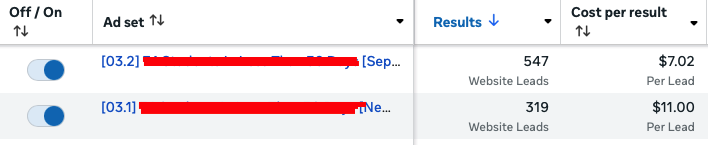
I'm not gonna try to persuade you with a lot of different results & social proof. That's guru sh*t.
You've got literally nothing to lose.
It's $49.99 and 30-day guarantee. More than enough time for you to test and decide if it's worth it or not.
What You'll Master
1
Introduction to Tracking
- What is Tracking
- Tools and Concepts
2
Google Tag Manager
- Creating a GTM account
- Initial configurations
- Variables (email, phone, cookie…)
3
Triggers and Tags
- Creating Triggers
- Tags to store and send data
4
Google Analytics
- GA4 and setup
- Custom Tags and Events
5
Facebook Ads (Web)
- Pixel and Advanced Matching
- Sending events via browser
6
Google Ads
- Conversions and Tags
- Remarketing and User Data
7
GTM Server-Side
- Stape.io and setup
- Server-Side in practice
8
Facebook Ads Server (API)
- Sending events via API
- External ID and advanced parameters
9
Practical Implementation
- From scratch to full structure
10
Events via Webhook
- Webhook from GTM Web to Server
- Database with spreadsheet
- Sending to Facebook and API
Price?
Extremely Cheap.
-
Setup of Google Tag Manager Web – sending data to Facebook Ads, Google Ads, and Google Analytics$197.00
-
Setup of Google Tag Manager Server – sending data to Facebook Ads via Conversions API$197.00
-
Complete structure for lead capture + automatic tracking spreadsheet$97.00
Full training value:
$491.00
You’ll learn all this for only:
$49.99
30-Day Money-Back Guarantee — no questions asked
Founders Launch Price — available only until October 10
The course officially launched on October 5. After October 10, the price will increase.